Codaryn
Arc Pathway
Arc Pathway
- 📁 Digital file available after purchase
- 🗂️ Long-term availability
- 🔒 Secure checkout
- 📝 Content updated in 2026
Couldn't load pickup availability
Self-paced learning overview
Problem Statement
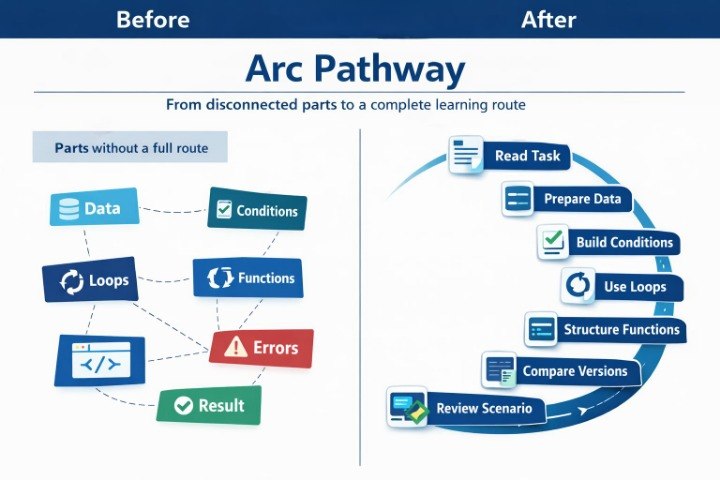
At a later stage of learning, a learner may know many separate Python programming topics but still need an organized system for combining them. In longer examples, it is often difficult to understand how data, conditions, loops, functions, and intermediate values connect. One task may have several parts, and each part can influence the next one. Without seeing the overall logic, code may feel fragmented, even when all separate elements are already familiar. Arc Pathway was created to help learners work with full learning scenarios and see the connection between all code parts.
Solution
Arc Pathway presents Python programming as a structured learning route from task description to a built example. Learners see how the structure is formed: which data is needed, which checks should be added, where a loop fits, when a function makes code more readable, and how the result is formed. The materials explain not only separate commands but also the role of each block in the full logic. The tier combines scenarios, breakdowns, code completion tasks, comparison tasks, and review notes. Arc Pathway fits well after Neon Pathway, when the learner can already see the structure of longer examples and is ready to work with connected learning routes.
What’s Inside
Arc Pathway includes learning materials built around the full cycle of working with Python programming tasks. The first module is called “Arc Start”. In it, learners practice reading a learning task before writing code. The materials explain how to identify input data, which result needs to be formed, which limits the example has, and which topics may be needed to build the solution. This helps learners avoid starting from a random code line and first see the learning logic of the task.
The second module focuses on data preparation. Learners explore examples with variables, text values, numbers, lists, and starting data sets. The explanations show why it matters to prepare values correctly before conditions, loops, or functions. Some tasks invite learners to change the starting data and describe how this affects later execution.
The third module focuses on building conditions. Here, learners work with checks, several decision branches, nested conditions, and logical operators. The materials explain how conditions affect the execution path, how to find the main check, and how not to confuse the main logic with additional checks. In the tasks, learners compare different condition versions and describe how program behavior changes.
The fourth module presents loops as part of the learning route. Learners see how a loop can move through a list, check each element, change an intermediate value, and pass the result forward. In this module, the focus is not only on understanding repetition but also on seeing its place in the full example structure. The explanations are given through an ordered breakdown: what happens before the loop, what repeats, what changes inside, and what remains after completion.
The fifth module explores functions as a way to collect logic inside a separate block. Learners see examples of functions that receive values, work with lists, contain conditions, use loops, and return a result. The materials explain how a function name connects with its action, which parameters are needed, how to read the inner logic, and how to check the returned value.
The sixth module is called “Arc Build”. In it, learners work with examples that are built gradually. First, a short task version is shown; then a list is added, followed by a condition, a loop, a function, and the final result. Each stage includes an explanation: what was added, why this part is needed, and how it changes the code structure. This format helps learners see how a learning example grows from a simple idea into a connected scenario.
The seventh module is dedicated to reading full scenarios. Learners receive a longer code fragment and divide it into logical parts: preparation, checking, repetition, processing, function, and result. Then they describe the role of each part in their own words. The Codaryn breakdown shows how these parts connect with each other and why execution order matters.
The eighth module focuses on comparing code versions. Learners see several versions of one learning scenario: sequential code, code with a function, code with an additional check, and code with a list and loop. The task is to compare the structure, not only the final result. Learners analyze where the data is more visible, where the check is easier to follow, where there is less repetition, and where value changes are simpler to trace.
The ninth module is called “Arc Review”. This is a review block where key topics return through short summaries, questions, code fragments, and practical tasks. Learners review variables, conditions, loops, lists, functions, errors, intermediate values, and scenario structure. Each subsection includes a concise description, an example, and a self-check task.
A separate Arc Pathway block focuses on errors in connected examples. Learners see situations where an error appears not from one isolated line, but from the interaction of several code parts. For example, a list is prepared differently than the function expected; a condition did not consider an empty value; a loop changed a variable that is later used in the result. The materials explain how to read these situations in order: from input data to the place where the summary is formed.
The tier also includes scenario completion tasks. Learners receive part of the code and add a missing block: data preparation, condition, loop, function, empty-list check, or result return. After completion, a breakdown explains why that part is needed and how it affects the whole example.
Another part of the tier is “Arc Notes”. These are notes for reviewing the full task structure. They collect questions learners can ask while reading or writing code: which data enters the example, what is checked, where repetition happens, which part handles processing, what the function returns, and which result is formed at the end. These notes help learners look at code as a connected system.
Arc Pathway also includes practical scenarios for working with the material. They are built around learning situations: processing a list of values, checking text data, counting elements, filtering simple values, creating a summary message, or working with a function that combines several steps. Each scenario includes an explanation, parts for independent work, and a final breakdown.
Who Is This For?
Arc Pathway is suitable for learners who already know the main topics of Python programming and want to work with them in connected learning scenarios. It is a good option for those who understand separate examples but want to better see how they form the full logic of a task.
This tier is also useful for learners who want to read longer code, explain structure in personal wording, and see the role of each block. If connected examples make it difficult to follow the path from data to result, Arc Pathway helps divide the material into understandable parts. It fits learners who value structured routes, scenarios, code breakdowns, and logic completion tasks.
What You’ll Learn
- How to read a learning task before writing code.
- How to identify input data and the expected result.
- How to combine variables, lists, conditions, loops, and functions.
- How to build an example gradually, step by step.
- How to read longer code through logical parts.
- How to explain the role of each block in your own words.
- How to compare several versions of one scenario.
- How to find the cause of an error in a connected example.
- How to complete code with a missing logic part.
- How to use notes to review the full task structure.
30-Day Refund Policy
Arc Pathway includes a 30-day refund policy. If, after purchase, the learner sees that the format of the materials does not fit their needs, they can contact the Codaryn team within 30 days. The request is reviewed according to the refund terms described on the site. This section is presented as calm purchase information without pressure or exaggerated claims.
How is learning organized in Codaryn?
How is learning organized in Codaryn?
Learning is divided into topics, blocks, and practical examples. This format helps learners study Python programming through an organized path: concept, example, task, and review.
Can a paid order be refunded if the course does not fit my needs?
Can a paid order be refunded if the course does not fit my needs?
Yes, paid tiers include a 30-day refund policy. If the materials do not match the learner’s expectations, they can contact the Codaryn team within 30 days after purchase, and the request will be reviewed according to the refund terms.
What is included in Codaryn tiers?
What is included in Codaryn tiers?
Depending on the tier, learners receive learning modules, practical tasks, code examples, term explanations, short topic summaries, and additional resources for review. The tiers are arranged in a growing order, with each following tier offering a wider set of materials.
Are Codaryn courses suitable for starting Python programming?
Are Codaryn courses suitable for starting Python programming?
Yes, Codaryn materials are organized to help learners gradually explore Python programming topics. Each tier has its own depth, from introductory explanations to wider collections with tasks, examples, and learning resources.
Share