Codaryn
Mode Guide
Mode Guide
- 📁 Digital file available after purchase
- 🗂️ Long-term availability
- 🔒 Secure checkout
- 📝 Content updated in 2026
Couldn't load pickup availability
Self-paced learning overview
Problem Statement
At this stage, a learner may already know the basic ideas of Python programming, but understanding how code behaves in different situations can still be challenging. The same fragment may act differently when a value, check order, or list structure changes. Because of that, a learner may see the result but not immediately understand why the program reached it. This is especially noticeable when working with conditions, loops, functions, and nested blocks. Mode Guide was created to examine these execution modes carefully and help learners read code through a sequence of decisions.
Solution
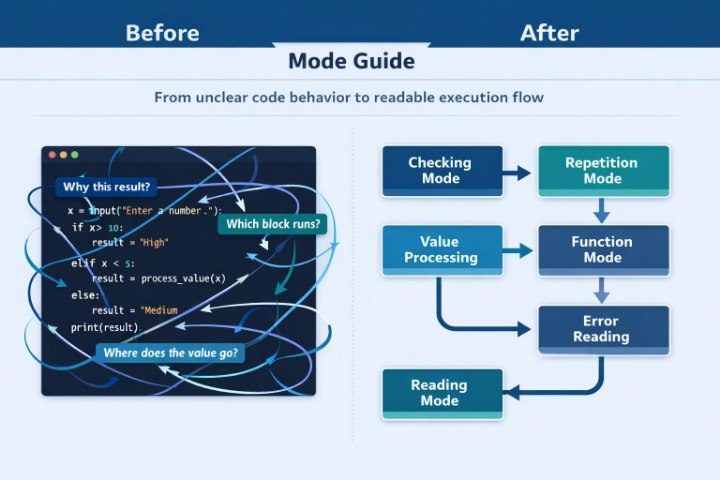
Mode Guide presents Python programming through the idea of modes: checking mode, repetition mode, value processing mode, result return mode, and error reading mode. Each section explains how a certain part of code behaves under different conditions. The learner does not only see an example but also practices asking clear questions: which value is being checked, which block runs, what changes after each step, and where the result is formed. This approach helps learners examine code through its movement and logic rather than through mechanical repetition. Mode Guide fits well after Echo Bundle, when the learner has already reviewed recurring topics and is ready to analyze program behavior more closely.
What’s Inside
Mode Guide includes a collection of learning modules that show Python programming through different execution modes. The first module focuses on checking mode. It covers conditions, comparisons, logical operators, and situations where code chooses one of several paths. Learners see examples where the result depends on a number, text value, the presence of an element in a list, or a combination of several checks. Each example includes a breakdown: what is being checked, which branch runs, and how the result changes with a different value.
The second module explains repetition mode. Here, learners work with loops, sequences, and repeated actions. The materials show how a loop moves through a list, how a variable changes, how a final result is formed, and how to read code execution step by step. Special attention is given to situations where a loop runs more or fewer times than expected. These examples help learners follow the start, continuation condition, and ending point of a loop more carefully.
The third module is dedicated to value processing mode. It includes simple examples with text, numbers, lists, and intermediate calculation results. Learners see how values are stored, changed, passed into a function, or used in a condition. The materials explain why value type matters, how not to confuse text and numbers, how to check an intermediate result, and how to describe the action of code in personal wording.
The fourth module focuses on functions. Here, a function is viewed as a separate working mode of code: it receives data, runs a certain logic, and returns a result. Learners explore examples where a function checks a value, processes a list, creates a text result, or combines several simple actions. The explanations clearly show where the function starts, which data it receives, what happens inside, and what returns after execution.
The fifth module is called “Reading Mode”. It is dedicated to reading code without rushing. Learners practice dividing an example into parts: data preparation, checking, repetition, processing, and result. This block includes tasks where the goal is not to write new code, but to explain an existing example. This format helps learners see the logic of an example more clearly and avoid getting lost in nested structures.
A separate part of Mode Guide focuses on errors. It does not present errors as something alarming, but as part of the learning process. Learners see common situations: an incorrect variable name, mismatched data type, extra or missing indentation, a condition issue, or a return statement placed in the wrong location. Each situation includes an explanation: what happened, which line should be checked, how to read the message, and how to find the reason through logic.
The tier also includes practical tasks in a “change the mode” format. For example, a learner receives code that works with one value and then changes it so it works with a list. Or they see a condition that checks a number and rewrite it for a text value. These tasks help learners notice how code structure changes when the learning task changes.
Mode Guide includes summary notes after each module. They collect the main ideas, short explanations, review examples, and self-check questions. Learners can return to these notes to revisit how a certain execution mode works without rereading the full module.
Who Is This For?
Mode Guide is suitable for learners who already know basic Python programming topics and want to better understand code behavior in different situations. It is a good option for those who can read examples but want to see more clearly why a program follows a certain path.
This tier is also useful for learners who want to explain code in their own words. If conditions, loops, or functions sometimes feel confusing, Mode Guide helps divide an example into parts and trace its logic. It fits learners who value careful breakdowns, practical tasks, and learning notes for review.
What You’ll Learn
- How to read code behavior under different conditions.
- How checks, comparisons, and logical operators work.
- How to trace loop execution step by step.
- How values change while a program runs.
- How a function receives data and returns a result.
- How to explain existing code in your own words.
- How to divide an example into preparation, checking, repetition, and result.
- How to analyze common errors without random guessing.
- How to adjust code for another learning task.
- How to use notes to review important concepts.
30-Day Refund Policy
Mode Guide includes a 30-day refund policy. If, after purchase, the learner sees that the materials do not match their expectations, they can contact the Codaryn team within 30 days. The request is reviewed according to the refund terms described on the site. This section is presented as clear purchase information without pressure or exaggerated claims.
How is learning organized in Codaryn?
How is learning organized in Codaryn?
Learning is divided into topics, blocks, and practical examples. This format helps learners study Python programming through an organized path: concept, example, task, and review.
Can a paid order be refunded if the course does not fit my needs?
Can a paid order be refunded if the course does not fit my needs?
Yes, paid tiers include a 30-day refund policy. If the materials do not match the learner’s expectations, they can contact the Codaryn team within 30 days after purchase, and the request will be reviewed according to the refund terms.
What is included in Codaryn tiers?
What is included in Codaryn tiers?
Depending on the tier, learners receive learning modules, practical tasks, code examples, term explanations, short topic summaries, and additional resources for review. The tiers are arranged in a growing order, with each following tier offering a wider set of materials.
Are Codaryn courses suitable for starting Python programming?
Are Codaryn courses suitable for starting Python programming?
Yes, Codaryn materials are organized to help learners gradually explore Python programming topics. Each tier has its own depth, from introductory explanations to wider collections with tasks, examples, and learning resources.
Share